SharePoint Dragons

Nikander & Margriet on SharePoint

Category Archives: Uncategorized

Office 365 2013 Preview

Lately, we’ve been getting the question how to get to the Office 365 2013 Preview a lot, so here goes: http://www.microsoft.com/office/preview/en

Wiki Scorecard

Margriet is a regular TechNet Wiki contributor. Read more about Wiki scorecard in the following Wiki article: http://blogs.technet.com/b/wikininjas/archive/2012/07/24/wiki-scorecard.aspx.

Enabling a wireless network for your virtual machine

We liked this article about enabling a wireless network for your virtual machine: http://www.elmajdal.net/win2k8/enabling_wireless_network_for_hyper_v_virtual_machine.aspx.

SharePoint 2013: What to do? Farm solution vs Sandbox vs App

Time changes perspective on things. After the release of each new version of SharePoint, we look forward to find out via blogs, wikis, books, podcasts and what have you, what was fundamentally wrong with the previous version. One thing we did not anticipate was the premature end of the tale of the sandbox solution. Apparently, sandboxed solutions are deprecated in SharePoint 2013. Let’s recap for a moment, shall we?

For SharePoint 2010, the SharePoint team introduced an elaborate architecture model for hosting sandboxed solutions, which was provided to offer an attractive alternative to farm solutions. Farm solutions are deployed to the GAC or web app bin folder, and have the potential to destabilize the SharePoint farm. They require IT pros to have a working knowledge of Code Access Security (CAS) if you want to limit and/or understand the capabilities of a farm solution. In real life, this proved to be a challenge.

Sandboxed solutions changed all that. The sandbox is a separate process in which SharePoint solutions (so called sandboxed solutions) run in isolation in the User Code Service, running under a very strict CAS policy that, however, does allow you to make service calls on the client side or full trust proxy calls on the server side.  To top it all, there was a sandbox resource limitation mechanism, that allowed IT pros to specify resource throttling settings to prevent sandbox solutions from over expanding server resources. All of a sudden, sandboxed solutions suddenly became so important that almost every authoritative resource gave advice that dictated clearly that you should always develop sandboxed solutions unless forced otherwise. This was probably the most recommended development best practice for SharePoint 2010, and it was logical and sound advice. Or was it?

There’s a new kid in town, the App model. SharePoint Apps can be hosted in an isolated SharePoint site, or separate from the SharePoint farm, either on a dedicated self-hosted application server or in the cloud (Azure). SharePoint Apps then have to leverage the extended and improved client object model to connect back to the SharePoint farm if they want to do some work there (SharePoint server-side code is not allowed/possible for Apps). The major advantages of SharePoint apps are twofold:

  1. A separated app in itself doesn’t affect the performance of the SharePoint farm in any way, and doesn’t have to be managed from within the SharePoint farm. Having said that, do keep in mind that apps leveraging the SharePoint client object model of course impact SharePoint farm performance in an indirect way.
  2. As a developer/software company, you can distribute apps via the MS App Store which greatly facilitates finding an audience to redistribute your mind works, potentially making money doing that. Note: don’t get overexcited by this, estimates state that the average iPad app generates a revenue of $700, while typical development costs range between $20.000 and $30.000. Our advice is: keep it real, the only company which is sure to make money in these scenarios is the company owning the app store. Making money by selling software is actually hard work and takes considerable investments.

The new development best practice is to build SharePoint apps in situations where earlier, you would have chosen to build a sandboxed solution. Remarkably, some earlier advocates of sandboxed solutions have switched views 180 degrees, now claiming that sandboxed solutions obviously were useless from the beginning, since they were not allowed to do anything. That’s quite unfair. Probably, a more correct way of putting it, is that nowadays Microsoft feels that whatever you did with sandboxed solutions can also be done, in a better way, via SharePoint Apps.

When we first learned about SharePoint Apps, they seemed like a logical extension to the existing development options. The fact that sandboxed solutions are now deprecated, surprised us, nevertheless, it’s interesting to do a comparison. It’s still a bit early in the game, as SharePoint 2013 has yet to be released, so this overview is bound to undergo some changes. Check out this Wiki page for recent updates: http://social.technet.microsoft.com/wiki/contents/articles/13373.sharepoint-2013-what-to-do-farm-solution-vs-sandbox-vs-app.aspx . But for now, here goes:

Sandbox Apps Farm
When to use Deprecated. Therefore, it’s unadvisable to build new sandboxed solutions. Best practice. Create apps whenever you can. Create farm solutions when you can’t do it in an app. See http://www.learningsharepoint.com/2012/07/20/sharepoint-2013-apps-vs-farm-solutions/  for more info.
Server-side code Runs under a strict CAS policy and is limited in what it can do. No SharePoint server-code. When apps are hosted in an isolated SharePoint site, no server-code whatsoever is allowed. Can run full trust code or run under fine grained custom CAS policies.
Resource throttling Run under an advanced resource management system that allows resource point allocation and automatic shutdown for troublesome solutions. Apps run isolated from a SharePoint farm, but can have an indirect impact by leveraging the client object model. Can impact SharePoint server-farm stability directly.
Runs cross-domain No, and there’s no need to since code runs within the SharePoint farm. Yes, which provides a very interesting way to distribute server loads. No, and there’s no need to since code runs within the SharePoint farm.
Efficiency/Performance Runs on the server farm, but in a dedicated isolated process. The sandbox architecture provides overhead. Apps hosted on separate app servers (even cross-domain) or in the cloud may cause considerable overhead. Very efficient.
Safety Very safe. Apps rely on OAuth 2.0. The OAuth 2.0 standard is surrounded by some controversy (for example, check out what OAuth lead author Eran Hammer has to say about it here: http://hueniverse.com/2012/07/oauth-2-0-and-the-road-to-hell/ .  In fact, some SharePoint experts have gone on the record stating that security for Apps will become a big problem. We’ll just have to wait and see how this turns out. Can be very safe, but this requires
Should IT pros worry over it? Due the the limited CAS permissions and resource throttling system, IT pros don’t have to worry. Apps are able to do a lot via the client OM. There are some uncertainties concerning the safety of an App running on a page with other Apps. For now, this seems to be the most worry-able option, but we’ll have to see how this plays out. Definitely. This type of solutions run on the SharePoint farm itself and therefore can have a profound impact.
Manageability Easy to manage within the SharePoint farm. Can be managed on a dedicated environment without SharePoint. Dedicated app admins can take care of this. Easy to manage within the SharePoint farm.
Cloud support Yes Yes, also support for App MarketPlace. No, on-premises only.

Continuous Integration in .NET

We find CI in .NET a difficult topic, because you’ll typically need assemble a lot of different building blocks. It’s not a luxury to have a book paving the directions for you. The book CI in .NET by Kawalerowicz (http://www.amazon.com/Continuous-Integration-NET-Marcin-Kawalerowicz/dp/1935182552/ref=sr_1_1?s=books&ie=UTF8&qid=1339077947&sr=1-1) does exactly this. We’ve been technical proofreaders for this book, and it was fun to do so. The book discusses:

  • What is CI?
  • Setting up various source control systems
  • Automating the build process
  • Choosing CI servers
  • Getting continuous feedback
  • Continuous Unit testing
  • Performing integration, system, and acceptance testing
  • Analyzing code using FxCop, StyleCop, NDepend, and TeamCity
  • Generating documentation via XML or Sandcastle
  • Deployment and delivery
  • Continuous database integration
  • Extending CI

Putting a face on the TN Wiki community

Margriet is a regular TechNet Wiki contributor. Read more about how Wiki Ninja interviews put a face on the TN Wiki Community: http://blogs.technet.com/b/wikininjas/archive/2012/06/21/putting-a-face-on-the-tn-wiki-community.aspx.

Wiki Statistics as a future feature?

Margriet is a regular TechNet Wiki contributor. Read more about how Margriet thinks about Wiki statistics as a future feature: http://blogs.technet.com/b/wikininjas/archive/2012/07/11/wiki-statistics-as-a-future-feature.aspx.

RBS Back Up

If you use RBS (see http://www.loisandclark.eu/Pages/blob.aspx for detailed info) and back-up and recover the SharePoint farm or content database, or use SQL Server backup and recovery, RBS data will automatically be backed up and recovered as well using the SQL FileStream provider. This won’t happen in cases where you’re using a 3rd party RBS provider. The following link contains a nice overview of what gets backed up using which method: http://technet.microsoft.com/en-us/library/cc261687(office.14).aspx.

Colligo Briefcase

It looks like Colligo succeeded in bridging the gap between SharePoint and iPad (or iPhone) with their product Colligo Briefcase. Colligo Briefcase (http://www.colligobriefcase.com/) is a secure solution to work with SharePoint on an iPad/iPhone or iPod. Let’s take a look at some of the features of Colligo Briefcase:

  • You can view all your SharePoint files, including Office documents, PDFs, images and emails with the appropriate icons.
  • You can edit files, lists and metadata, even while offline and sync these changes when you’re online again.
  • You can choose what you want to sync, so you can choose to sync only the documents that you need.
  • You have a Favorites option where you can add documents that you want to access very often.
  • Using the search capabilities makes it easy to find content.

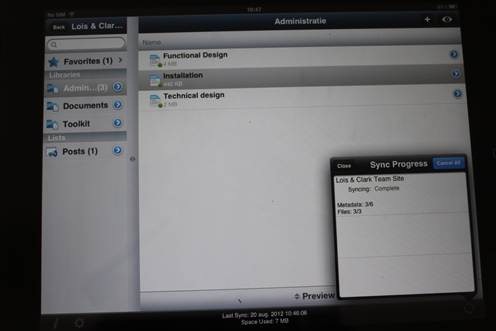
Installing and configuring Colligo Briefcase is rather simple. You can find Colligo Briefcase in the App Store. After installing the tool you will find an icon on your device. Next is the configuring part, by clicking the Colligo Briefcase icon you will be able to add a SharePoint site. The basic things you have to know are: Url, Username and Password. But that shouldn’t be a problem because you’re using SharePoint all the time ;-). You can also set the sync interval (there are several choices), the storage limit (from 20 MB to Unlimited) and the lists to sync (which lists do you want to sync on your device). After configuring these settings and clicking Done Colligo will start syncing your content:

clip_image002

Using Colligo Briefcase is very intuitive. On the left you will find the lists (as you’re used to have in SharePoint). By selecting a list you will get an overview of the contents of that list on the right. Okay, it is not SharePoint but it works almost the same. You have to get used to it but that will take only 30 minutes and after that you can work on your iPad in your SharePoint site.

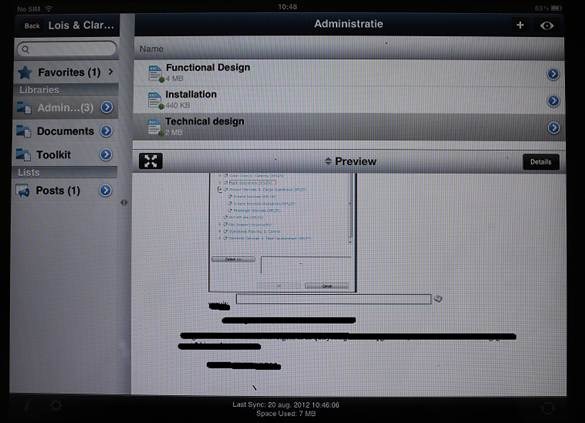
A cool feature of Colligo Briefcase is the preview option. You can select a document library, click on a document and click Preview. You can also read the full version but a preview version is handy to know if you’ve got the right document.

clip_image004

If you are looking for a product to work with on your Apple device, you should definitely take a look at Colligo Briefcase. Right now Colligo Briefcase has a special launch price of $2.99, plus it’s a universal app so you can install it on both your iPad and iPhone!

JackpotCity: iPhone app reviewed

Whenever we review a site or mobile app we feel a responsibility to provide our readers with an accurate representation of what is offered and the technical requirements involved. In the case of JackpotCity’s mobile iPhone app a word that comes to mind is seamless. The developers at JackpotCity have seamlessly integrated their online casino into a mobile version that can be downloaded as an app for a variety of smart phones, including the iPhone.

We focus on how the app performed on the iPhone and discuss the benefits offered by JackpotCity to its Apple device users. The app download is a small file that can be accessed by visiting www.jackpotcity.co.uk/mobile-casino/iphone/ and the memory space required is minimal, thus ensuring it does not slow down or clog your iPhone. The games on offer have all been developed by top online casino software developers, Microgaming and run smoothly and flawlessly when played using the app.

The JackpotCity gaming developers have taken full advantage of the features offered by the iPhone and the games can be played either in portrait or landscape mode, the touch screen integration has been carefully plotted to ensure user friendliness and the high speed processor contributes to ensuring graphics render correctly every second, taking full advantage of the hi re screen display.

The choice of games available on the iPhone app is impressive and a selection of high profile slots is available in both straight slots and progressive jackpot versions. Popular table game roulette is offered in 3 different gaming versions and blackjack is also available. There is also a selection of video poker games available as well as other casino-style entertainment. We tested all the games using the app and found that the iPhone was the perfect platform for mobile casino gaming thanks to its many state of the art features.

All the games available through the JackpotCity mobile iPhone app are available for free play and no deposits are required, however real money gaming is on offer and we tested this function to ensure it lived up to the online casino standards. The mobile iPhone app is also governed by the standards of the online casino and adheres to the eCOGRA code of conduct, ensuring all gaming is undertaken in a fair, safe and secure environment.

The mobile app offers safe and secure gaming and the banking options for deposits and payouts include major credit cards such as Visa and MasterCard, popular eWallet services and PayPal. Overall our JackpotCity mobile casino iPhone app experience was completely enjoyable ad we would recommend this service to any gamer who wants to play portable games on their iPhone.