
SharePoint Dragons

Nikander & Margriet on SharePoint

Farm backup

We really liked the following discussion about farm backups: http://social.technet.microsoft.com/Forums/en-US/sharepoint2010setup/thread/362973b7-f8bb-4910-892c-82117381fce5 Btw, someone must have misread a part of the question, as a backup of 5tb in 15-20 min is what we’d call “optimistic”!

TechNET Wiki page Performance

DebugDiag

The Debug Diagnostic Tool (v1.2) is a tool that assists in troubleshooting issues such as slow performance and memory leaks. It’s created by MS and also contains a dedicated SharePoint Analysis Script. You can download it at http://www.microsoft.com/en-us/download/details.aspx?id=26798

Best Practices for Service Accounts

We like the following post about best practices for service accounts: http://seclists.org/basics/2008/Sep/225 Although this is not limited to SharePoint, we tend to see the world to SharePoint glasses and apply it to the SharePoint world.

Copying or moving a thicket file

We remember, a long time ago, when we were working on a chapter for an MS Press Administrator Companion book, we were reading one of the other chapters and it mentioned a thicket file. We re-read it, baffled, and the sentence still said thicket file. We later found it that this is a pretty common reaction to thicket files. We looked it up and found out a thicket is an Office doc saved as a web page. Every time you save a file as HTML that contains contains resources that can’t be stored within HTML (such as images) these get stored in a special linked folder called [file name]_files.

When you save a thicket in a SharePoint library, the special linked folder gets hidden. Also, SharePoint “protects” this type of folder by preventing you from creating folders that end with either _file or _files. In such cases, it appends an underscore (_) and renames the folder name to either _file_ or _files_:

image

Another thing to note about the combination of thicket file/SharePoint is that it’s not easy to copy or move them. Renaming or deleting the html file won’t affect the special linked folder and if you use the object model to rename it (using the MoveTo() method) you’ll get an error message saying you can’t copy or move a thicket file. A work-around exists and it’s described here: http://sharemypoint.wordpress.com/2007/07/24/_files-folder-part-2-you-cannot-copy-or-move-a-thicket-file-how-to-rename/

Keep your focus – Kyteman

Someone once gave us the advice that every blog should have a focus point. In our case, that’s easy, our main focus point is and remains SharePoint. Most of our posts are directly related to this topic. The second part of the advice was that you can do off-topic blog posts up to a maximum of 20%. And that, if you choose to do an off-topic post, you should choose it well.

Well, here it is. Our first off-topic post. It’s completely unrelated to SharePoint, instead it’s related to music. Kyteman is a young Dutch musician, and there are times when we think he just might be brilliant. Or, as http://kyteman.com/#about puts it, Kyteman was born with an unusual gift for music. Our non-Dutch readers probably won’t know him, therefore we thought it a wonderful idea to introduce him. In the Netherlands, he made impact with this performance:

Kyteman wants to break down genre barriers and mixes them to, according to himself, “a collection of sounds, somewhere between opera, hip-hop, drum & bass, electro, minimalism and all kinds of other genres that I can’t even begin to describe, for I don’t have the words for them. All the instrumentals for this record were done in one take, with practically no edits whatsoever. So we played everything exactly as you hear it on the album.”

Here’s another sample (and his latest single) of what he can do:

Or check the complete version:

So, what do you think? Have you seen another newcomer surprising and pleasing you more in the last couple of years? If so, we’d sure be interested to hear who that is!

Keeping track of statistics

There are situations when you don’t have access to any log files or dashboard that allows you to see traffic statistics. For us, TechNet Wiki pages we’ve created are an example of this. Office 365 seems to be another example: at least we didn’t find it in the administration pages, any good tip for seeing Office 365 web traffic will be appreciated!http://statcounter.com/ allows you to add a simple HTML code snippet and then offers a dashboard for keeping record off the traffic.

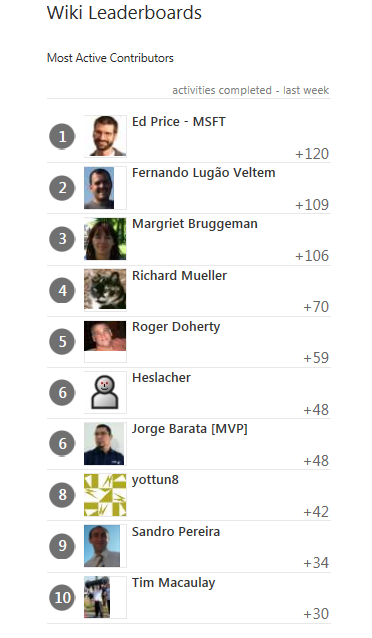
Most active Wiki contributors

Last week, Margriet has been quite active in the TechNet Wiki community. To tell the truth it was to her own surprise (see http://social.technet.microsoft.com/wiki/contents/articles/default.aspx) that Margriet ranked quite high. Now it’s a game, lets see if Margriet can move up one or two places.

image

Going for a CAML ride

This article saved us some time, it’s a good reminder, maybe it will help you too: http://www.sharepoint-tips.com/2007/04/one-of-more-field-types-are-not.html It emphasizes that you should use internal field names in CAML queries and advises to use the U2U CAML Builder tool to get them for you.

Being featured…

The Wiki page http://social.technet.microsoft.com/wiki/contents/articles/10590.sharepoint-2010-best-practices-to-estimating-and-benchmarking-project-efforts.aspx is being featured on the home page of TechNet Wiki.

Quote from Ed Price:

“Congratulations on this article being featured on the home page of TechNet Wiki!”

You can see the nomination at

http://social.technet.microsoft.com/wiki/contents/articles/3568.technet-wiki-featured-article-nominees.aspx#SharePoint