
SharePoint Dragons

Nikander & Margriet on SharePoint

Category Archives: Uncategorized

SPC 2012

SPC 2012 has clearly started! We can clearly see it in our blog log files which have been cut through half, a significant amount of SharePoint enthusiasts is attending SPC 2012!

Just a thought about SharePoint Apps and WSRP

The concept of Apps somehow makes us think of Web Services for Remote Portlets (WSRP). WSRP is a specification for defining presentation-oriented web services and it has in common with Apps that both try to offer a way to reuse applications in another environment in a fluent and integrated way. In other words, they try to make possible to reuse applications without making it to obvious to the end user that it’s a 3rd party solution. Since its 2007 version, SharePoint has been able to consume WSRP services, but although being reasonably popular in the Java world, creating WSRP producers hasn’t really taken off in the .NET/ SharePoint world. If you are interested in more information about WSRP, please check out http://en.wikipedia.org/wiki/Web_Services_for_Remote_Portlets.

Converting your Windows Server 2012 to a workstation

We kinda like this manual for converting your windows server 2012 to a workstation: http://www.win2012workstation.com/ . It also provides a link to the Microsoft Server Converter 2012, a tool that can do the manual labor for you!

SharePoint 2013 RTM?

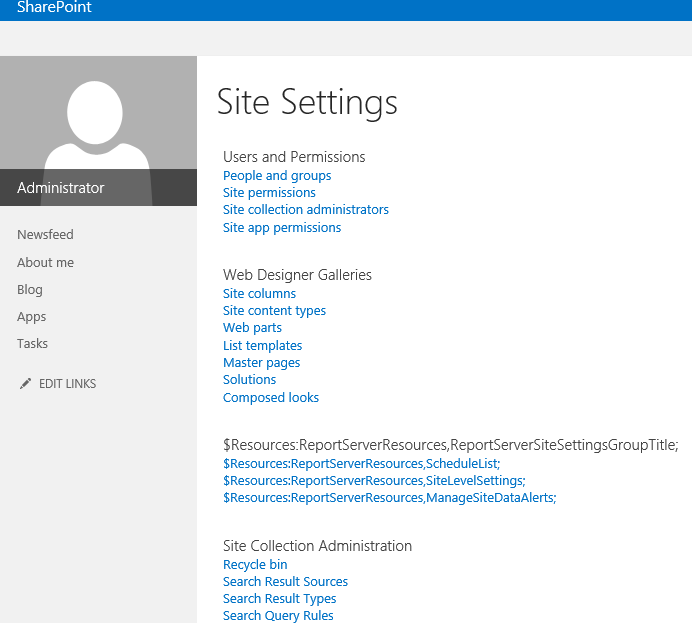
The SharePoint 2013 RTM is released, but we’re pretty sure it’s not completely finished. Check out the Report Server section of Site Settings in the screenshot:

image

SharePoint 2013 Design Manager

Just noticed the SharePoint 2013 Design Manager: it looks interesting http://sharepointbrian.com/2012/07/intro-to-sharepoint-2013-design-manager/ , so we’re gonna take it for a test spin!

Seattle.master

In SharePoint 2010, the default master page was called v4.master (there’s logic in this name), in SharePoint 2013 RC it was called v15.master (there’s also logic in that name, but inconsistent with the previous version), and now, in SharePoint 2013 RTM all of a sudden it became seattle.master. What is up with that? From Microsoft, you would have expected something more professional. It takes us back to the days when we did a .NET project (a normal business application) and one of the developers named a page KnockOnMyDoor.aspx. After further inspection, his method names were even weirder, non-descriptive and the only thing consistent about it was that all the weird names appealed to his weird sense of humor. Maybe tomorrow we wake up it turns out it was all a bad dream and that there is no seattle.master.

SharePoint 2013 Best Practice Update

The TechNet Wiki SharePoint 2013 Best Practice page has been updated, the App section has been newly added. Check it out at http://social.technet.microsoft.com/wiki/contents/articles/12438.sharepoint-2013-best-practices.aspx .

SharePoint 2013 App Environment: Everything is fine, but we had a small problem

It certainly seems to be true that the tone of voice in SharePoint 2013 is pretty upbeat, not only when compared with previous versions, but in general. Already, the “working on it” feedback you get when SharePoint is busy has become something of a catch phrase amongst SharePoint devs and admins. It’s a great thing, whenever someone comes up to you and asks you’ve finished something, you can just look up and reply: working on it!

We’ve witnessed another nice example of this upbeat tone when we finished completing toe configuration of the App environment which allows end users to install SharePoint Store Apps, see http://technet.microsoft.com/en-us/library/fp161236(v=office.15) if you want to know how to do that.

Of course, after configuring the App environment, we immediately tried to install one of the SharePoint Store Apps and this is what we got: “Everything is fine, but we had a small problem getting your license. Please go back to the SharePoint Store to get this app again and you won’t be charged for it.”

We appreciate the positivity of the message, but in fact things are not fine and this problem doesn’t get away over time. The message probably means you’re trying to add Apps using the SharePoint System Account, which we found out is not allowed by design as importing App licenses under this account could lead to performance problems (we’re wondering why?) as stated at http://technet.microsoft.com/en-us/library/fp161231(v=office.15).aspx .

So instead, you need to use a regular user account to install Apps. It’s not as easy to sign in as a different user account as it used to be. In SharePoint 2013, the quick shortcut Sign in as Different User is missing, so one thing you can do is go to Start > click Shift + Internet Explorer and choose Run as Different User to run the browser in a different user context. We found that that’s not even enough, because now the SharePoint Store has trouble detecting language settings, so you need to actually log in as a different user. After that, adding Apps from the SharePoint Store should work fine.

Office 2007/2010 feature overview

For a customer, we had to provide a feature overview of SharePoint 2010 integration with Office 2007 and Office 2010. We really liked this post: http://techdhaan.wordpress.com/2010/03/05/office-2010-integration-with-sharepoint-2010-compared-with-office-2007/

SharePoint 2010 Best Practices

The TechNet Wiki SharePoint 2010 Best Practices page at http://social.technet.microsoft.com/wiki/contents/articles/8666.sharepoint-2010-best-practices.aspx#Extranet_Environments is updated again. Check out the Extranet section!