
SharePoint Dragons

Nikander & Margriet on SharePoint

Category Archives: Uncategorized

Basic App interaction trick

SharePoint 2013 Apps can’t communicate with each other (hey, did we just address a new feature for Apps vNext, the App communication framework? We bet your hat it is). But since SharePoint 2013 can interact with parent SharePoint sites, it might be a good idea to create lists and libraries in one of the parent SharePoint sites if you want multiple Apps to access them or need to establish basic interaction between multiple Apps.

SharePoint 2013 Dev Environment

What’s the ideal dev machine now that SharePoint 2013 no longer supports being installed on a client OS? Probably run a Windows Server 2012 virtual machine using Hyper-V on Windows 8, with at least 24 GB.

Do we trust the little App vendor?

Although it’s still really early in the life of the SharePoint Store, it will be interesting to see how and if a potential issue will be resolved. The enterprise market is a totally different one than, let’s say, the smart phone market. Although it’s certainly possible that a one-man developer shop creates a valuable SharePoint App, and, through the SharePoint Store has no trouble reaching a huge audience, it remains to be seen if companies are willing to put enough trust in unknown smaller vendors to buy and/or use their Apps within their own SharePoint environments. We did notice that most of the Apps that are currently available ask for Full permissions, almost by convenience. We’re afraid that this will become the trend. It will definitely help smaller vendors trying to sell their Apps if they limit themselves in their needs for permissions.

Try SharePoint Online Preview

In the past, it has taken us some time to find the correct place to find the place where we could sign up for the new SharePoint Online Preview based on SharePoint 2013. Well, it’s here: http://technet.microsoft.com/en-US/evalcenter/hh973397 For other evaluations, check out the TechNet Evaluation Center at http://technet.microsoft.com/en-us/evalcenter

Selling branding solutions via SharePoint Apps

Thus far, branding solutions have been proposed as likely and logical candidates for Apps that will be sold via the SharePoint Store. We have our doubts, in our experience the selling of branding solutions hasn’t really taken off so far. People are eager to try free branding additions, presumably often using them for presentation purposes. Paying for these solutions is another thing, as most companies have a strict set of rules and principles in place regarding company design in software applications. We’ll be curious to see if the App model will be able to change all this. We may have missed it, but it seems that the current SharePoint Store offering is of yet lacking in this area.

Web PI for getting WAW

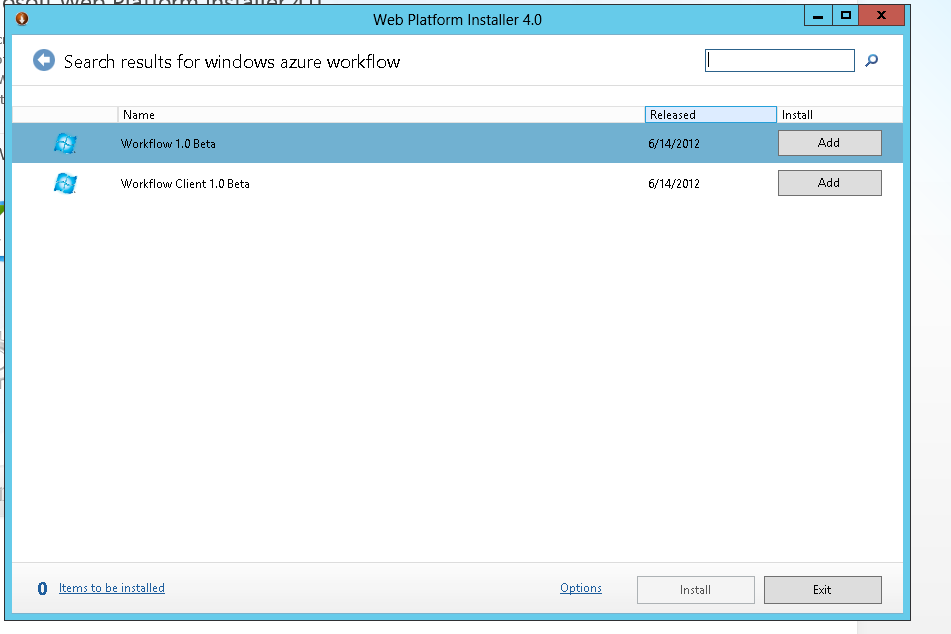
On SPC 2012, we saw a presenter use the Microsoft Web Platform Installer (Web PI) tool to get the latest version of Windows Azure Workflow (WAW), a required component if you want to run SharePoint 2013 workflows (btw, those workflows are not available for SharePoint Foundation), so we checked it out at http://www.microsoft.com/web/downloads/platform.aspx. Apparently, the tool is appalicious or apptastic or something, and makes getting the latest version of a wide range of components really easy.

If you take a closer look at the picture, you might notice that getting the latest version is a relative thing, since it’s still showing the beta versions. This will lead to problems later when running the Register-SPWorkflowService  cmdlet like this:

Register-SPWorkflowService –SPSite “http://myserver/mysitecollection” –WorkflowHostUri “http://workflow.example.com:12291” –AllowOAuthHttp

It will look for the v1.0 version of the Workflow client assembly, instead of v2.0. For now, it’s better to download WAW by searching for it and not do it via Web PI.

image

Hiding the Quick Launch Bar in SharePoint 2013

The following article did a nice job to explain how to hide the quick launch bar in SharePoint 2010: http://www.sharepointpromag.com/article/sharepoint/ways-add-remove-quick-launch-menu-control-140338 . It’s not that different in SharePoint 2013, although the Div IDs are different. If you follow Step 3 in the article, then create a CSS file and add the following:

/* Hide quick launch bar */

#sideNavBox {

display: none;

}

/* Hide quick launch bar */

#contentBox {

margin-left:20px !important;

}

Then reference this css file in your master page, you will have accomplished the same thing in SPS 2013!

Multiple Corporate Catalogs

App Catalogs are special SharePoint document libraries that contain SharePoint Apps. There are special site collections containing App Catalogs, called App Catalog sites. Each SharePoint web application is associated to a single App Catalog site, and each SharePoint farm can have multiple App Catalog sites. Every App Catalog site has two App Catalogs: one document library that is intended for SharePoint Apps, the other one is intended for Office Apps. App Catalog Sites are a great thing, because they allow you to set up a Corporate Catalog for Apps that you want to make available throughout your entire organization, or throughout certain parts in your organization. So, whereas the SharePoint Store provides a public marketplace, a Corporate Catalog provides an internal App catalog for Apps that are approved for use within the organization.

The most popular reason for creating multiple Corporate Catalogs is the need to apply different security settings on a catalog. It’s quite common that some end users need to have access to a set of Apps, while others don’t. As a bonus, limiting the number of Apps seen by the end user to a useful set makes it easier for end users to choose. Huge numbers of Apps in Corporate Catalogs usually confuse end users and are counterproductive.

The OAuth Abstraction Layer

In SharePoint 2013, SharePoint Apps purchased from the SharePoint Store from SharePoint Online leverage the OAuth security protocol to communicate with SharePoint.

In these cases, the client application (or: the SharePoint Aps) sends requests to the resource server (SharePoint) which hosts the resources that are controlled by the end user (or resource owner) and is capable of accepting and responding to protected resource requests using access tokens. The three roles in OAuth, consisting of client, resource server, and resource owner, are also fondly known as the OAuth Love Triangle.

In addition, the OAuth infrastructure requires the presence of an authorization server, a trusted server authenticating client applications and issuing access tokens to client applications authorizing them to access end user resources. It is possible that the server also acts as the authorization server, but the authorization server as a separate entity is equally possible. A single authorization server may serve multiple application servers. The OAuth specification doesn’t address the interaction between server and authorization server, so that implementation is completely left to the discretion of the vendor implementing OAuth. For SharePoint Online, Azure Access Control Service (ACS)  is the authorization service.

As you may have noticed, OAuth recognizes client applications (in this case, SharePoint Apps) having their own identity recognized apart from user identities. This notion sets OAuth (and S2S, the default security protocol used by SharePoint Apps in on-premises installations) apart from other authorization protocols.

Doesn’t it seems like all architectural problems in the world can be solved by adding one or more abstraction layers? OAuth is another example of this provoking thought.

App prediction November 2012

In spite of Apps development being the best practice for SharePoint 2013, we expect that the additional overhead of App architecture, deployment, configuration, and management will push on-premise customers to the Farm solution customization model. For Office 365 deployments, it is clear the App model is quite a natural fit and will be by far the most popular customization model. Let’s see how things turn out a year from now…