SharePoint Dragons

Nikander & Margriet on SharePoint

Tag Archives: sharepoint2010

Asset vs Picture library revised

The Asset vs Picture library TechNet Wiki article has been revised. You can find the latest version here: http://social.technet.microsoft.com/wiki/contents/articles/8110.sharepoint-2010-best-practices-asset-vs-picture-library-en-us.aspx

ULS in logging database

You can use the logging database to store ULS logs, check http://www.oriolardevol.com/Article/Details/36. See http://www.oriolardevol.com/Article/Details/Sharepoint%20Logging%20database%20-%20ULS%20Trace%20tables,%20how%20they%20work for info on how it is stored. Consolidated storage and access to the ULS is a huge benefit, and also makes querying it a lot easier. In addition, the logging db also contains other useful info such as DMVs and performance counters:http://sharepoint.microsoft.com/blogs/fromthefield/Lists/Posts/Post.aspx?ID=124

Farm backup

We really liked the following discussion about farm backups: http://social.technet.microsoft.com/Forums/en-US/sharepoint2010setup/thread/362973b7-f8bb-4910-892c-82117381fce5 Btw, someone must have misread a part of the question, as a backup of 5tb in 15-20 min is what we’d call “optimistic”!

TechNET Wiki page Performance

DebugDiag

The Debug Diagnostic Tool (v1.2) is a tool that assists in troubleshooting issues such as slow performance and memory leaks. It’s created by MS and also contains a dedicated SharePoint Analysis Script. You can download it at http://www.microsoft.com/en-us/download/details.aspx?id=26798

Best Practices for Service Accounts

We like the following post about best practices for service accounts: http://seclists.org/basics/2008/Sep/225 Although this is not limited to SharePoint, we tend to see the world to SharePoint glasses and apply it to the SharePoint world.

Copying or moving a thicket file

We remember, a long time ago, when we were working on a chapter for an MS Press Administrator Companion book, we were reading one of the other chapters and it mentioned a thicket file. We re-read it, baffled, and the sentence still said thicket file. We later found it that this is a pretty common reaction to thicket files. We looked it up and found out a thicket is an Office doc saved as a web page. Every time you save a file as HTML that contains contains resources that can’t be stored within HTML (such as images) these get stored in a special linked folder called [file name]_files.

When you save a thicket in a SharePoint library, the special linked folder gets hidden. Also, SharePoint “protects” this type of folder by preventing you from creating folders that end with either _file or _files. In such cases, it appends an underscore (_) and renames the folder name to either _file_ or _files_:

image

Another thing to note about the combination of thicket file/SharePoint is that it’s not easy to copy or move them. Renaming or deleting the html file won’t affect the special linked folder and if you use the object model to rename it (using the MoveTo() method) you’ll get an error message saying you can’t copy or move a thicket file. A work-around exists and it’s described here: http://sharemypoint.wordpress.com/2007/07/24/_files-folder-part-2-you-cannot-copy-or-move-a-thicket-file-how-to-rename/

Going for a CAML ride

This article saved us some time, it’s a good reminder, maybe it will help you too: http://www.sharepoint-tips.com/2007/04/one-of-more-field-types-are-not.html It emphasizes that you should use internal field names in CAML queries and advises to use the U2U CAML Builder tool to get them for you.

Being featured…

The Wiki page http://social.technet.microsoft.com/wiki/contents/articles/10590.sharepoint-2010-best-practices-to-estimating-and-benchmarking-project-efforts.aspx is being featured on the home page of TechNet Wiki.

Quote from Ed Price:

“Congratulations on this article being featured on the home page of TechNet Wiki!”

You can see the nomination at

http://social.technet.microsoft.com/wiki/contents/articles/3568.technet-wiki-featured-article-nominees.aspx#SharePoint

SPMetal looses spaces in choice field

Recently, we were creating a web part that displays entities generated with SPMetal. One of the columns is a status field called MyStatus of type Choice. In the display, it just shows “InReview”, when the actual value is “In Review”.

The code does something similar to this:

using System;
using System.Web.UI;
using System.Web.UI.WebControls;
using System.Web.UI.WebControls.WebParts;
using Microsoft.SharePoint;
using System.Linq;

namespace VisualWebPartProject1.VisualWebPart1
{
    public partial class VisualWebPart1UserControl : UserControl
    {
        AstroDataContext dc = new AstroDataContext(SPContext.Current.Web.Url);
        protected override void OnPreRender(EventArgs e)
        {
            var query = (from item in dc.MyPrintList
                                     select item).ToList<MyPrintBaseType>();

            gvOverview.AutoGenerateColumns = false;
            gvOverview.DataSource = query;
            gvOverview.DataBind();
        }
    }
}

The declarative part looks something like this:

<asp:GridView runat=”server” ID=”gvOverview” AllowPaging=”False”>
    <Columns>
        <asp:TemplateField HeaderText=”Print”>
            <ItemTemplate>
                <input type=”checkbox” id=’chkAvail<%#DataBinder.Eval(Container.DataItem, “Id”)%>’
                    value='<%#DataBinder.Eval(Container.DataItem, “Id”)%>’ checked />
            </ItemTemplate>
        </asp:TemplateField>
        <asp:BoundField HeaderText=”ID” DataField=”ID” />
        <asp:BoundField HeaderText=”Title” DataField=”Title” />           
        <asp:TemplateField HeaderText=”Status”>
            <ItemTemplate>
                <div id=”divStatus<%#DataBinder.Eval(Container.DataItem, “Id”)%>”>
                <%#DataBinder.Eval(Container.DataItem, “MyStatus”)%>                   
                </div>
            </ItemTemplate>
        </asp:TemplateField>

        <asp:TemplateField HeaderText=”Date”>
            <ItemTemplate>
                <asp:Label ID=”Label1″ Text='<%#DataBinder.Eval(Container.DataItem, “MyDate”,”{0:dd-MM-yyyy}”)%>’
                    runat=”server” />
            </ItemTemplate>
        </asp:TemplateField>
    </Columns>
</asp:GridView>

This result be seen in the next figure.
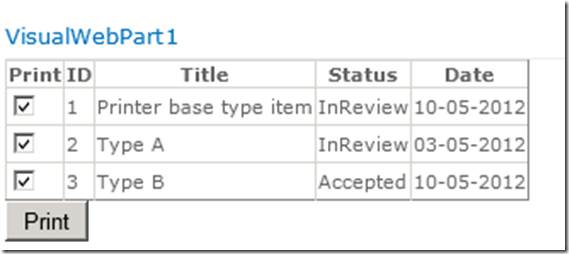
image

So, somebody stole our spaces! Our immediate response to this brutal case of space theft was to find the bandit responsible for this. We had one main suspect…

SPMetal! When we took a look at the code generated by SPMetal, it’s quite clear why the spaces are missing. The original, full-blown, values are stored as attributes in the MyStatus enumeration. However, the actual names within the enumeration, as generated by SPMetal, are used when displayed in the SPGridView:

public enum MyStatus : int {

None = 0,

Invalid = 1,

[Microsoft.SharePoint.Linq.ChoiceAttribute(Value=”Unread”)]
Unread = 2,

[Microsoft.SharePoint.Linq.ChoiceAttribute(Value=”In Review”)]
InReview = 4,

[Microsoft.SharePoint.Linq.ChoiceAttribute(Value=”Accepted”)]
Accepted = 8,

[Microsoft.SharePoint.Linq.ChoiceAttribute(Value=”Denied”)]
Denied = 16,

[Microsoft.SharePoint.Linq.ChoiceAttribute(Value=”Remark”)]
Remark = 32,
}


As is explained in http://msdn.microsoft.com/en-us/library/ee537010.aspx , this is normal behavior. Since SPMetal generates partial classes, one way to get around it is to create a partial class for the entity representing your content type that provides a method or property that returns the attribute associated with a given enumeration value. Another way would be to generate an extension method that does the same. The implementation of such an extension method is shown in the answer in thread http://sharepoint.stackexchange.com/questions/21750/frustrated-linq-to-sharepoint-choice-values-losing-spaces .

Another way, and we guess the cleanest way if you’re only reading data, is to override the SPMetal defaults by using a Parameters XML file. See http://msdn.microsoft.com/en-us/library/ee535056.aspx for details.

In our case, we’ve saved the following XML in a file called params.xml:

<?xml version=”1.0″ encoding=”utf-8″?>
<Web xmlns=”http://schemas.microsoft.com/SharePoint/2009/spmetal”>
  <ContentType Name=”MyPrintBaseType” Class=”MyPrintBaseType”>
    <Column Name=”MyStatus” Member=”MyStatus” Type=”String” />
  </ContentType>
</Web>

This XML file says that we want to convert our MyStatus field to the type of String, which causes the original values to be included. See http://blogs.msdn.com/b/sharepointdev/archive/2011/05/03/using-linq-to-sharepoint-with-choice-fields.aspx , it also discusses a scenario where you want to write to a choice field too.

Then, we’ve generated our entities anew using the parameters XML file:

spmetal /web:http://astro /code:Astro.cs /parameters:params.xml

The end result meets our needs:
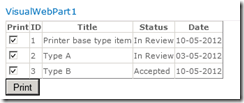
image