SharePoint Dragons

Nikander & Margriet on SharePoint

Category Archives: Uncategorized

Troubleshooting an SSRS report that times out

Just started a Wiki page that discusses what to do when you have a slow performing SSRS report. Everybody is more than welcome to contribute at http://social.technet.microsoft.com/wiki/contents/articles/9950.sharepoint-2010-best-practice-troubleshooting-an-ssrs-report-that-times-out.aspx

Convert SPMetal Linq query to CAML

As a follow up to article https://sharepointdragons.com/2012/04/21/how-to-check-if-the-current-user-has-already-created-a-list-item-of-a-certain-content-type/ , based on a reader’s question. This is a slightly updated version of the code that writes the underlying CAML to the console output window, like so:

astro.Log = Console.Out;

By explicitly calling it like so you’re exporting the CAML to a text file:

myconsole.exe > caml.txt

The complete code looks like this:
using System;
using System.Collections.Generic;
using System.Linq;
using System.Text;

namespace ConsoleApplication4
{
    class Program
    {
        static void Main(string[] args)
        {
            // Open entities context generated by spmetal
            // if a sharepoint context is available, use new AstroDataContext(SPContext.Current.Web.Url) instead.
            using (var astro = new AstroDataContext(“http://astro”))
            {
                var timeItems = (from item in astro.MyMetalList
                                                                        where item.GetType() == typeof(Timecard)
                                                                        select (Timecard) item);

                // Call it like this: myconsole.exe > caml.txt
                astro.Log = Console.Out;               

                // Enter specific user name in lambda expression below, for example using: SPContext.Current.Web.CurrentUser.LoginName
                int occurrences = timeItems.Where(item => item.UserName.ToLower() == “loisandclark\\administrator”).Count();
                if (occurrences == 0)
                {
                    Console.WriteLine(“it’s ok to add a request”);
                }
                else if (occurrences == 1)
                {
                    Console.WriteLine(“a request has already been submitted”);
                }
                else
                {
                    Console.WriteLine(“There are duplicate requests. This is an error, contact the administrator”);
                }

                foreach (var item in timeItems)
                {
                    Console.WriteLine(item.Title);
                }
            }
        }
    }
}


The resulting CAML looks like this:

<View><Query><Where><BeginsWith><FieldRef Name=”ContentTypeId” /><Value Type=”ContentTypeId”>0x01</Value></BeginsWith></Where></Query><ViewFields><FieldRef Name=”ID” /><FieldRef Name=”owshiddenversion” /><FieldRef Name=”FileDirRef” /><FieldRef Name=”Title” /><FieldRef Name=”ContentTypeId” /><FieldRef Name=”CustomerName_x003a__x0020_Compan” /><FieldRef Name=”CustomerName_x003a__x0020_FirstN” /><FieldRef Name=”CustomerName_x003a__x0020_LastNa” /><FieldRef Name=”MyCustWF” /><FieldRef Name=”URL” /><FieldRef Name=”Comments” /><FieldRef Name=”URLwMenu” /><FieldRef Name=”URLNoMenu” /><FieldRef Name=”Date” /><FieldRef Name=”DayOfWeek” /><FieldRef Name=”Start” /><FieldRef Name=”End” /><FieldRef Name=”In” /><FieldRef Name=”Out” /><FieldRef Name=”Break” /><FieldRef Name=”ScheduledWork” /><FieldRef Name=”Overtime” /><FieldRef Name=”NightWork” /><FieldRef Name=”HolidayNightWork” /><FieldRef Name=”Late” /><FieldRef Name=”LeaveEarly” /><FieldRef Name=”Oof” /><FieldRef Name=”ShortComment” /><FieldRef Name=”Vacation” /><FieldRef Name=”NumberOfVacation” /><FieldRef Name=”UserName” /><FieldRef Name=”PercentComplete” /><FieldRef Name=”Body” /><FieldRef Name=”StartDate” /><FieldRef Name=”TaskDueDate” /><FieldRef Name=”Priority” /><FieldRef Name=”TaskStatus” /><FieldRef Name=”AssignedTo” /><FieldRef Name=”DueDate” /><FieldRef Name=”Status” /><FieldRef Name=”Predecessors” LookupId=”TRUE” /><FieldRef Name=”FileLeafRef” /><FieldRef Name=”ItemChildCount” /><FieldRef Name=”FolderChildCount” /><FieldRef Name=”DocumentSetDescription” /><FieldRef Name=”Modified_x0020_By” /><FieldRef Name=”Created_x0020_By” /><FieldRef Name=”WikiField” /><FieldRef Name=”_vti_RoutingExistingProperties” /><FieldRef Name=”PreviewOnForm” /><FieldRef Name=”FileType” /><FieldRef Name=”ImageSize” /><FieldRef Name=”ImageWidth” /><FieldRef Name=”ImageHeight” /><FieldRef Name=”ImageCreateDate” /><FieldRef Name=”SelectedFlag” /><FieldRef Name=”NameOrTitle” /><FieldRef Name=”RequiredField” /><FieldRef Name=”Keywords” /><FieldRef Name=”Thumbnail” /><FieldRef Name=”Preview” /><FieldRef Name=”AlternateThumbnailUrl” /><FieldRef Name=”Description” /><FieldRef Name=”MyBcsName_x003a__x0020_FirstName” /><FieldRef Name=”MyySingleLineOfText” /><FieldRef Name=”MyMultiLines” /><FieldRef Name=”MyNumber” /><FieldRef Name=”MyCurrency” /><FieldRef Name=”MyDatTime” /><FieldRef Name=”MyLookup_x003a__x0020_LastName” /><FieldRef Name=”MyLookup_x003a__x0020_Company” /><FieldRef Name=”MyLookup_x003a__x0020_Phone” /><FieldRef Name=”MyYesNo” /><FieldRef Name=”MyLinkOrPic” /><FieldRef Name=”MyCalc” /><FieldRef Name=”MyExtDaa_x003a__x0020_LastName” /><FieldRef Name=”MyExtDaa_x003a__x0020_Phone” /><FieldRef Name=”MyChoice” /><FieldRef Name=”MyPersonOrGroup” /><FieldRef Name=”MySText” /><FieldRef Name=”MyMText” /><FieldRef Name=”ReviewStatus” /><FieldRef Name=”MyPeople” /><FieldRef Name=”MyYesNo0″ /></ViewFields><RowLimit Paged=”TRUE”>2147483647</RowLimit></View>

How to check if the current user has already created a list item of a certain content type?

This probably would have been a bit of a hassle before SPMetal existed, right now it’s quite easy to do. Here’s what we didi:

  • We created a custom list.
  • In advanced settings, we’ve enabled content types and added the ootb content type TimeCard.
  • Then, we added two list items: one of the default type, and one of the TimeCard type.

Having our test list set up and ready to go, we’ve used SPMetal to create entities representing, among other, this custom list. We did this by issuing the following command at the command prompt (assuming 14/bin is in your environment path variables):

spmetal /web:http://astro /code Astro.cs

Add the generated Astro.cs file to a VS.NET SharePoint project (in this case, we’ve used a simple console application).

using System;
using System.Collections.Generic;
using System.Linq;
using System.Text;

namespace ConsoleApplication4
{
    class Program
    {
        static void Main(string[] args)
        {
            // Open entities context generated by spmetal
            // if a sharepoint context is available, use new AstroDataContext(SPContext.Current.Web.Url) instead.
            using (var astro = new AstroDataContext(“http://astro”))
            {
                var timeItems = (from item in astro.MyMetalList
                                                                        where item.GetType() == typeof(Timecard)
                                                                        select (Timecard) item);

                // Enter specific user name in lambda expression below, for example using: SPContext.Current.Web.CurrentUser.LoginName
                int occurrences = timeItems.Where(item => item.UserName.ToLower() == “loisandclark\\administrator”).Count();
                if (occurrences == 0)
                {
                    Console.WriteLine(“it’s ok to add a request”);
                }
                else if (occurrences == 1)
                {
                    Console.WriteLine(“a request has already been submitted”);
                }
                else
                {
                    Console.WriteLine(“There are duplicate requests. This is an error, contact the administrator”);
                }

                foreach (var item in timeItems)
                {
                    Console.WriteLine(item.Title);
                }
            }
        }
    }
}

Authentication when using the SharePoint client object model

Normally, when you need to log in using a specific credential set in the SharePoint client object model, you’ll have to provide the correct credentials to authenticate to the SharePoint site collection, like so:

NetworkCredential credentials = new NetworkCredential(“username”, “pwd”, “domain”);

ClientContext context = new ClientContext(“http://thesitecollection”);

context.Credentials = credentials;

This won’t work if you have a claims based site set up supporting both Windows and forms authentication. See https://sharepointdragons.com/2012/01/30/claims-in-sharepoint-2010/ for more about setting that up. Instead, you need to set up the appropriate HTTP headers to disable Forms authentication, and it’ll work again:

ClientContext clientContext = new ClientContext(“http://thesitecollection“);clientContext.ExecutingWebRequest += new EventHandler<WebRequestEventArgs>(clientContext_ExecutingWebRequest);

Web site = clientContext.Web;

clientContext.Load(site);

clientContext.ExecuteQuery();


static void clientContext_ExecutingWebRequest(object sender, WebRequestEventArgs e){

    e.WebRequestExecutor.WebRequest.Headers.Add(“X-FORMS_BASED_AUTH_ACCEPTED”, “f”);

}

See http://social.technet.microsoft.com/Forums/en-US/sharepoint2010programming/thread/16cd0e26-8f3b-4ef2-bac4-c2c59849ab96 for more info.

How to set the people picker field to the current user?

An elegant way to do it is to use a bit of server side code with jQuery:

<script type=”text/javascript”> $(document).ready(function() {

$(‘div.ms-inputuserfield’).text($().SPServices.SPGetCurrentUser({fieldName: “Title”,debug: false}));

</script>

Looking for a sneaky way to prevent email notifications from being sent?

http://social.technet.microsoft.com/Forums/en-US/sharepoint2010programming/thread/4a42b080-3a59-45ae-a90e-2bce3d88657e provides the answer: just change the outgoing SMTP server to something else and switch it back 10-15 mins. Gotta love the simplicity of the idea.

So your mom threw away your Active Directory User…

What happens if a person leaves your organization and, as a consequence of that, somebody throws away the Active Directory user account, only to found out later that it still lingers on in SharePoint? You won’t be able to recreate the user because it’ll have a different SID, so what to do?

Use ol’ stsadm to the rescue: http://technet.microsoft.com/library/2a090c60-696f-4b68-8b6c-a19b763c60d3.aspx It allows you to migrate a user account to a new login name, optionally ignoring the SID meta data history.

Batch check in

A regular question that pops up is: how do I do a batch check in in SPS and SPF 2010? Not possible ootb, but there’s a 3rd party solution for it called Batch Metadata Edit and Check In: https://store.qipoint.com/product-p/sp14-01-batch.htm

Websites Like

Jeffrey Carter of Yahoo asked us if we’d like to review a new web site called WebsitesLike.org. It helps to find similar, related or alternative websites. We’ve taken a look and weren’t thrilled with the results. We couldn’t find our own web sites and names (we call this the intake test: every time a company is considering to hire you, they will search using your name and it’s best that they find something positive real soon) and when we looked for information about SharePoint we had to wade thru large numbers of commercial offererings without finding quality information. In case you want to check it out, here’s the address:  http://www.websiteslike.org .

Tool for detecting dangerous web sites

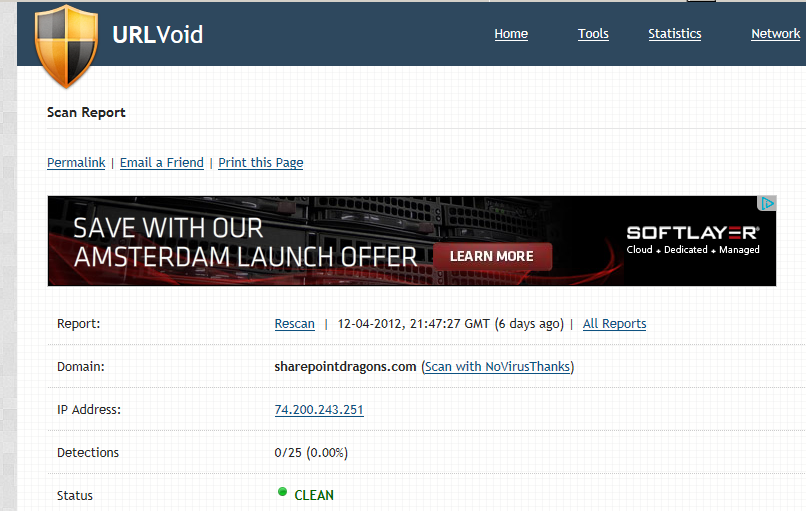
A tip by Mark Miller of End Users SharePoint (thanks btw): the http://urlvoid.com web site is a free service that allows users to scan a given website address to determine whether it’s potentially dangerous. To determine this, it uses various virus scanning tools. So, if you’d go to http://urlvoid.com/scan/sharepointdragons.com/ you’ll find we’re safe:

image